Yes, you can use a password manager without an account. KeePass apps such as KeePassium and Strongbox, Enpass, and our own Zen Passwords keep the vault on your devices, opened by a master password, with no vault account at the company that makes the app. 1Password, Bitwarden and Proton Pass all start with signing up, and Apple Passwords syncs through the Apple Account you already have.
Going without an account removes a whole layer of risk at the vendor. It also removes the company that could help you back in, so recovery becomes something you set up yourself. This guide covers both sides, and every claim about other apps comes from their own sites and listings as of 16 November 2026.
Why most password managers make you create an account
An account is how a cloud password manager knows which vault belongs to whom. It ties together the things that vendor runs on its own servers:
- Sync. Your encrypted vault is stored on the vendor's servers and each device downloads it after you sign in.
- Sharing. Family and team vaults need a way to name the other people, and that is an account per person.
- Billing. Subscriptions are attached to the account so the plan follows you to new devices.
- Web access. Most managers serve the vault from their own servers. Zen Passwords reads it from your own iCloud instead, in your browser.
- Recovery by someone else. An organizer or admin can let a member back in because the account links them.
One thing an account does not give you is a password reset. Well-built managers never know your master password. 1Password says it "never transmits, logs, or knows your account password", so its own recovery routes go through a family organizer, a team administrator or a recovery code you saved. People often sign up expecting a "forgot password" link that the security model cannot offer.
Some apps that once worked without an account now require one. 1Password 7 could keep standalone vaults on your devices; 1Password staff confirm that 1Password 8 does not support them. Bitwarden asks for an email address and a verification link before you save anything, and Proton's own switching guide begins with "create a Proton Pass account".
What a vendor account adds to your risk
Encryption protects the passwords inside a vault. It does not protect the account around it. The clearest public example is LastPass. In its December 2022 notice, LastPass said an attacker copied a backup of customer vault data along with customer account records. Here is how its own notice split what was taken:
| Data | State when copied | Exists because of |
|---|---|---|
| Company names, end-user names, billing addresses | Unencrypted | The customer account |
| Email addresses and telephone numbers | Unencrypted | The customer account |
| IP addresses used to reach LastPass | Unencrypted | Signing in to the service |
| Website URLs in the vault | Unencrypted | The vault format |
| Usernames, passwords, secure notes, form data | Encrypted | The vault |
Most rows in that table exist only because there was an account. A copied list of names, emails and the sites each person uses is a ready-made phishing list, even when every password stays encrypted. Our Zen Passwords vs LastPass comparison goes into what the encrypted part costs an attacker to guess.
Without a vendor account, three things go away:
- The vendor server holding everyone's vaults. There is no central copy to breach.
- The email address on file. There is nothing to put in a "your account needs attention" phishing email, and no customer list to leak.
- The sign-in page. Nobody can try your credentials against a login form, because there is no login form.
Which password managers work without an account
These are the managers we checked, from their own sites and US App Store listings as of 16 November 2026. "Vendor account" means an account with the company that makes the app, separate from any cloud storage you already use.
| App | Vendor account | Where the vault lives | How it syncs | Price |
|---|---|---|---|---|
| Zen Passwords (ours) | None | Your device | Optional, your own iCloud | Free for 5 items; Premium in-app |
| KeePassium | None | A KeePass file you choose | Optional, your cloud or server | Free; Premium in-app |
| Strongbox | None | A KeePass or Password Safe file | Optional, iCloud, Dropbox and more | Free; Pro from $2.99/month |
| Enpass | No vault account | Your devices | Optional, a cloud you choose | Free download; Premium in-app |
| Apple Passwords | Apple Account to sync | Device, or iCloud Keychain | iCloud Keychain | Free, built in |
| 1Password | Required | 1Password servers | 1Password account | Free download; plans in-app |
| Bitwarden | Required (email) | Bitwarden servers | Bitwarden account | Free download; plans in-app |
| Proton Pass | Required | Proton servers | Proton account | Free download; plans in-app |
The KeePass family: KeePassium, Strongbox and KeePassXC
KeePass apps were never built around accounts. Your vault is a single encrypted database file, and the app opens it with your master password. KeePassium says "you decide where you store your passwords" and its App Store listing describes it as "offline by default", with optional sync through cloud providers or your own server. Strongbox keeps databases on the local device or in iCloud, Dropbox, OneDrive, Google Drive, WebDAV or SFTP; its Pro tier is $2.99 a month, $19.99 or $24.99 a year as listed, or $99.99 for life.
The great strength of the format is portability. The same file opens in KeePassXC, the free open-source desktop app for Windows, Mac and Linux. If you need passwords on a Windows PC as well as an iPhone, a KeePass file is the most flexible no-account setup there is.
Enpass
Enpass states plainly: "We do not save your Enpass data on our servers." Data stays on your devices unless you choose to sync it through iCloud, Dropbox, Google Drive, OneDrive or WebDAV, and encryption happens on the device. It is the closest design to ours, and our Zen Passwords vs Enpass comparison covers where the two differ.
Apple Passwords: no new account, but your Apple Account
Apple Passwords asks you to sign up for nothing, which is why it often shows up in this search. Syncing, though, runs through iCloud Keychain under your Apple Account, and Apple asks you to turn on two-factor authentication for that account first. With iCloud Keychain off, Apple says password, passkey and credit card information is stored locally on the device. It is built around logins, so bank details, IDs and secure notes need somewhere else; see Zen Passwords vs Apple Passwords for the full list.
Browser password managers
Many people searching this phrase mean Chrome or Google. Google's help page says that when you are not signed in to Chrome, it stores passwords locally on your device. That works, but the passwords stay in that one browser profile, with no sync and no home for anything beyond logins.
How a vault works with no account
Without an account, the vault is anchored to secrets you hold instead of to an identity at a company. In Zen Passwords, setup is two screens and an Emergency Kit to save: choose a master password, type it again, save the kit, and the vault exists. No email, no verification link, no sign-in.
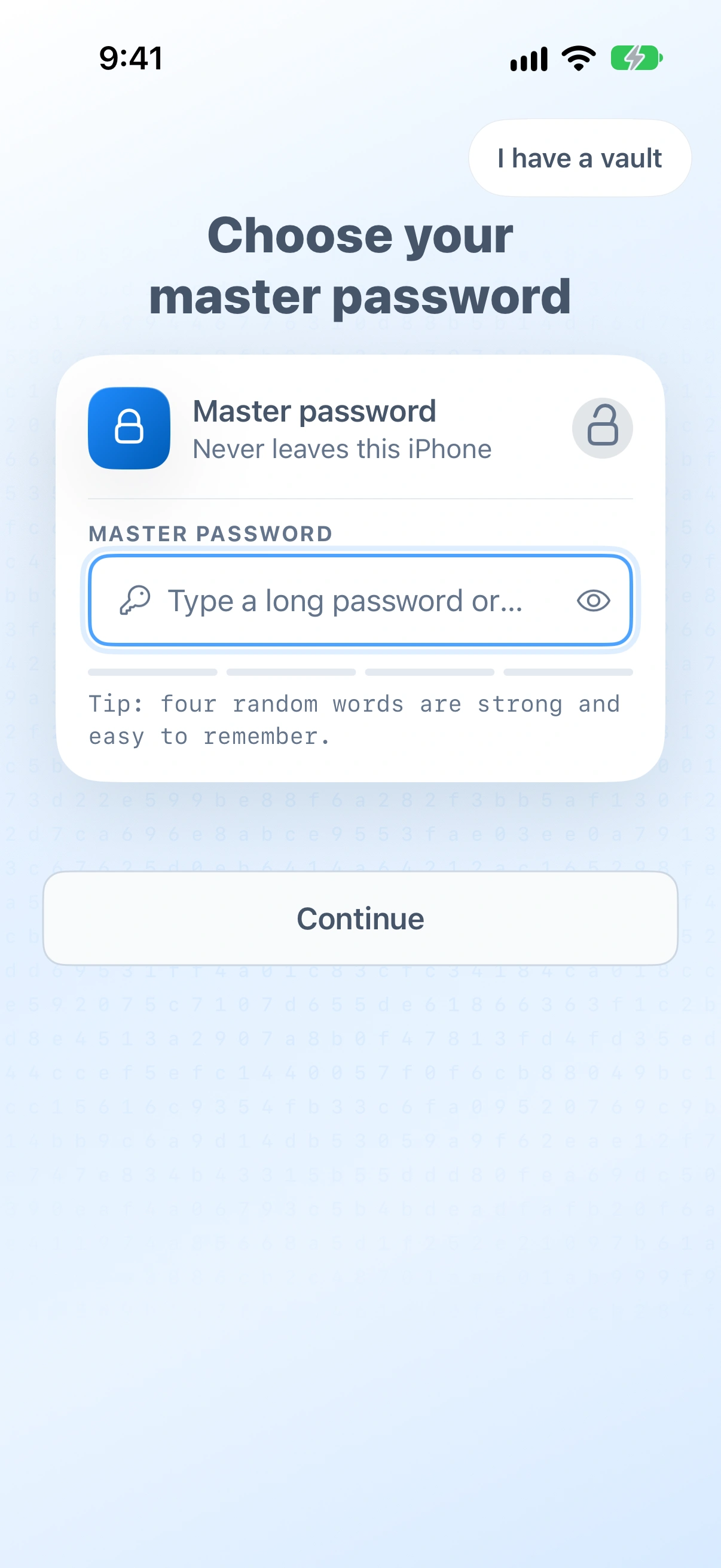
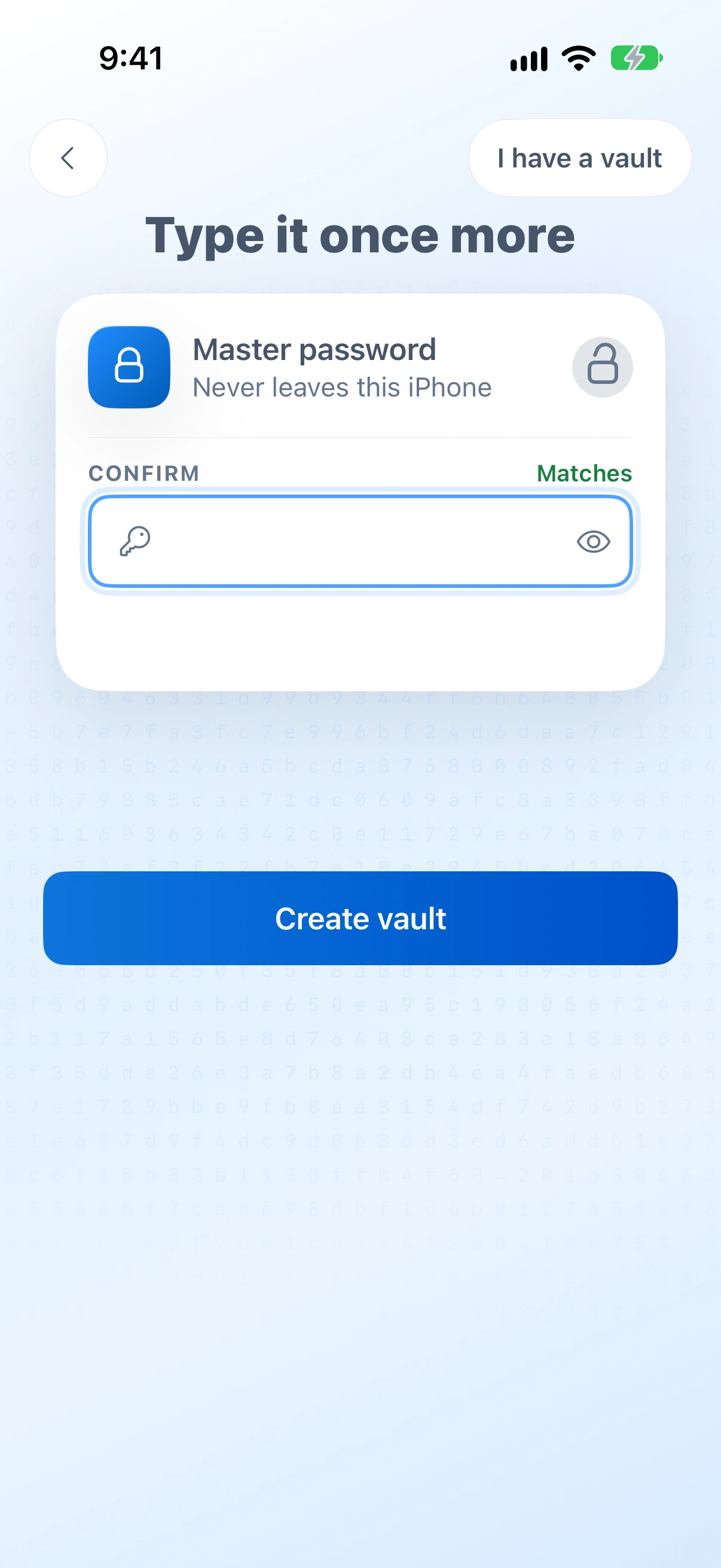
Behind those screens, the app derives the encryption keys on the device from your master password using Argon2id, and encrypts the vault before anything is stored or synced. Vaults created since August 2026 also get a 130-bit Secret Key, 26 characters generated on the device and never uploaded. The app asks for it when you add a new device, open the web vault or restore a backup, so a correctly guessed master password is useless without it. How the two-key vault works explains the design in detail.
Day to day, nothing about the missing account shows. AutoFill fills logins, one-time codes and passkeys in Safari and other apps, and the vault opens with no network at all, which our guide to the offline password manager for iPhone tests feature by feature.
The cost: nobody can reset your master password
This is the honest trade. We never receive your master password, so we cannot reset it, and neither can anyone who compromises us. No company can be phished, persuaded or compelled into opening your vault, and no company can rescue you either. As the 1Password quote above shows, that is also true of the best account-based managers; the difference is that with no account there is no organizer or admin route either.
So recovery is something you set up while you can still open the vault. Zen Passwords gives you two ways, and our support page on setting up a recovery key walks through both:
- A recovery key you keep. The app shows it once; print it or write it down and keep it with your important documents, never inside the vault it unlocks.
- Social recovery. The key is split across people you trust. Any few of them together can help you back in, and no single person can open the vault alone.
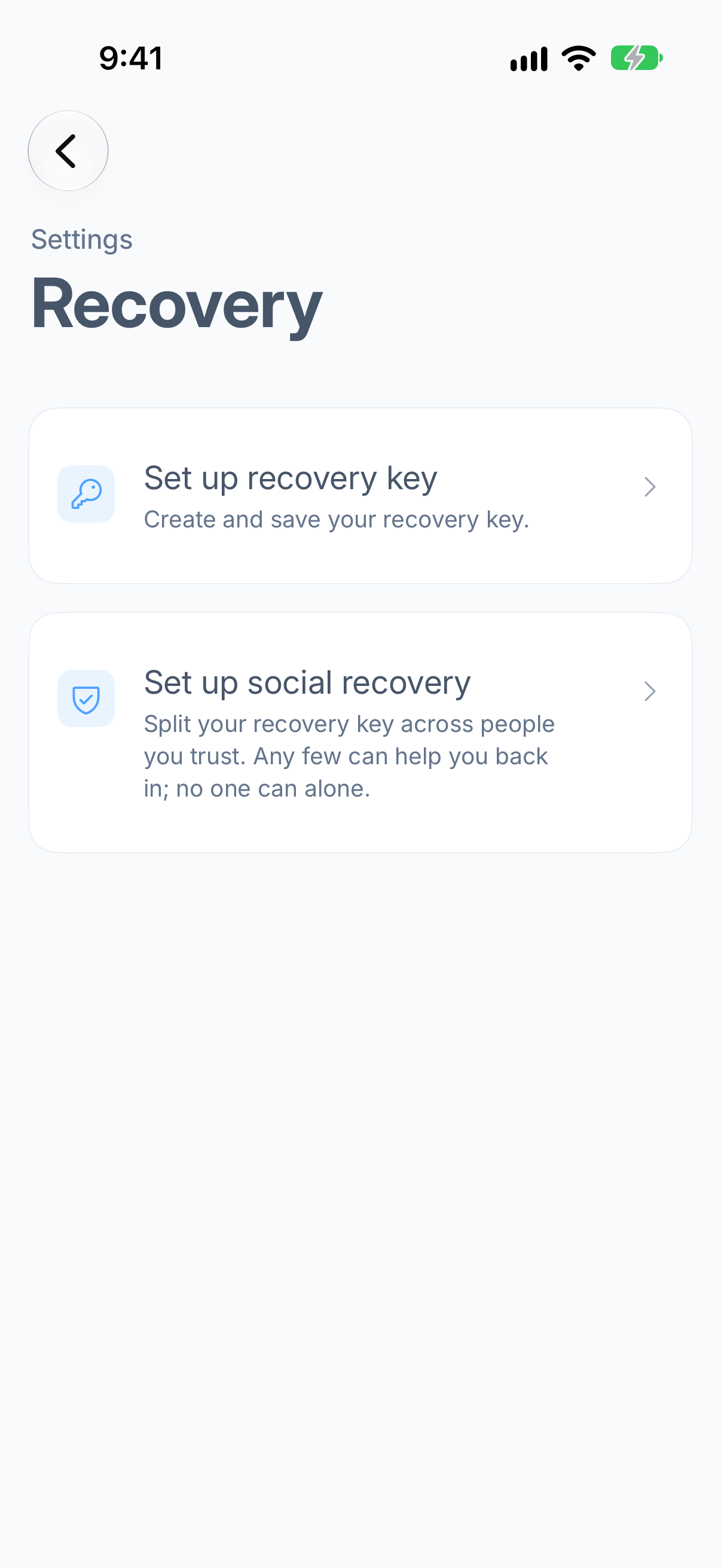
If you are already locked out, the master password recovery guide covers what you can still try. Encrypted backups are the other half of the plan: with no vendor holding a copy, scheduled encrypted backups to a folder you choose are your second copy.
Syncing with no account: your own iCloud
The usual objection to no-account managers is sync. KeePass apps and Enpass solve it by putting the encrypted file in a cloud drive you already use. Zen Passwords uses your own private iCloud under your Apple ID, carrying encrypted data only. It starts when the device is signed in to iCloud. To keep the vault on one device only, turn off iCloud for Zen Passwords in the iOS Settings app.
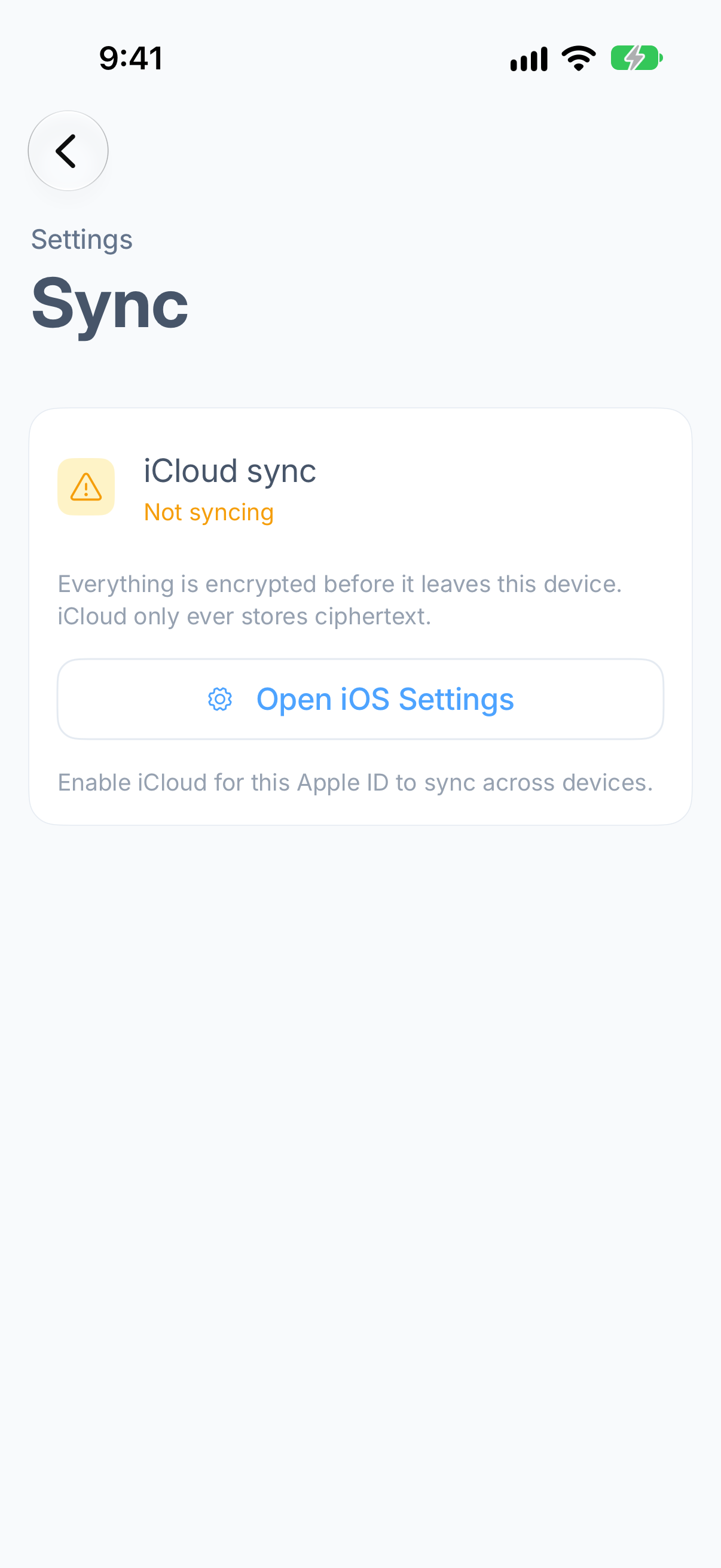
To be precise about it: iCloud sync does involve an account, the Apple Account you already have, but it never involves a Zen account, and Apple only ever holds ciphertext it cannot read. If you want the full walk-through of that setup, read a password manager that syncs through your own iCloud.
What you give up without an account
A no-account manager suits one person who wants their vault to belong to them. It is the wrong fit in a few cases, and it is better to know them up front:
- Sharing. Shared family and team vaults are built on accounts. Zen Passwords has no sharing.
- A full web app. You can read your vault at zenpasswords.com/vault from a borrowed computer, signed in with your Apple Account, but you cannot edit it there.
- Windows and Android. Zen Passwords is for iPhone, iPad and Mac only. A KeePass file is the no-account answer if you need other platforms.
- Someone to call. No support team can let you back in, so the recovery key or social recovery has to exist before you need it.
If sharing or Windows matter more than avoiding an account, Bitwarden and 1Password are good choices, and our Zen Passwords vs Bitwarden comparison says plainly where Bitwarden wins.
Checklist for choosing a password manager without an account
- Setup asks for no email. If the first screen wants an address, there is an account.
- You can see where the vault lives: this device, a file you picked, or your own cloud.
- Sync is optional and goes through storage you already control.
- There is a recovery option you hold yourself, such as a recovery key or social recovery.
- It makes encrypted backups, not only a plain-text CSV export.
- The vault can be opened without the original app. KeePass files open in any KeePass app; Zen Passwords backups open with the open-source, read-only zen-cli on Mac or Linux.
- It fills logins and one-time codes through the system AutoFill, so no-account does not mean copy and paste.
Try it without signing up for anything
Zen Passwords is free for five active items, and that free tier is the real app: AutoFill, sync, backups, recovery and all seven item types work on it. Create a vault, set up your recovery key, and see whether a vault with no account suits how you work. Zen Premium removes the item limit and adds the breach check; Apple shows the price before you buy, and the free tier and Premium page lists the details. Coming from 1Password? The 1Password alternative page shows how the move works when there is no account on our side to connect to.
Questions
Is there a password manager that does not require an account?
Yes. Zen Passwords, KeePassium, Strongbox and Enpass keep the vault on your devices with no vault account at the vendor. 1Password, Bitwarden and Proton Pass require one.
Is a password manager without an account safe?
It removes the vendor server, the email on file and the sign-in page that an attacker could target. The risk moves to you: keep a recovery key and encrypted backups, because nobody can reset your master password.
What happens if I forget my master password with no account?
No company can reset it. In Zen Passwords you get back in with a recovery key you saved or through social recovery, so set one up the day you create the vault.
Can I use Google Password Manager without a Google account?
Partly. Google says that when you are not signed in to Chrome, it stores passwords locally on your device, but they stay in that browser with no sync to other devices.
Does Apple Passwords need an Apple Account?
Syncing does: it runs through iCloud Keychain, which needs your Apple Account with two-factor authentication. With iCloud Keychain off, Apple says passwords and passkeys are stored locally on the device.
Can a password manager with no account still sync between devices?
Yes, through storage you already own. KeePass apps and Enpass sync an encrypted file through a cloud drive you choose, and Zen Passwords syncs encrypted data through your own private iCloud.